

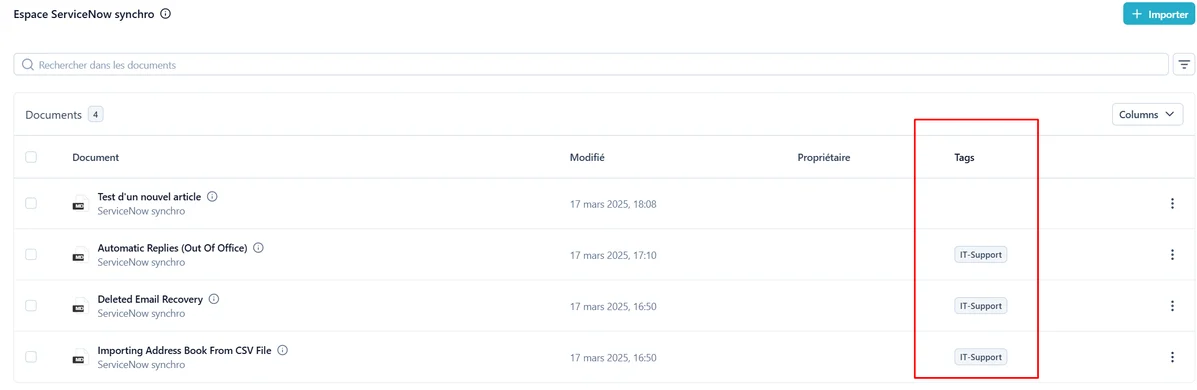
Tags are defined by an admin, applied through the API or our auto-tagging capability, and can they be used to scope your searches on a specific set of documents. They make your documents easier to find and will support advanced features going forward.
How Tags Are Created and Deleted
Company Admins can define a list of tags or delete them for their company either- through the admin interface in the
/admin/knowledge_graph/tag/url. - or through the dedicated API endpoints at
api/v3/docs/#/Tags
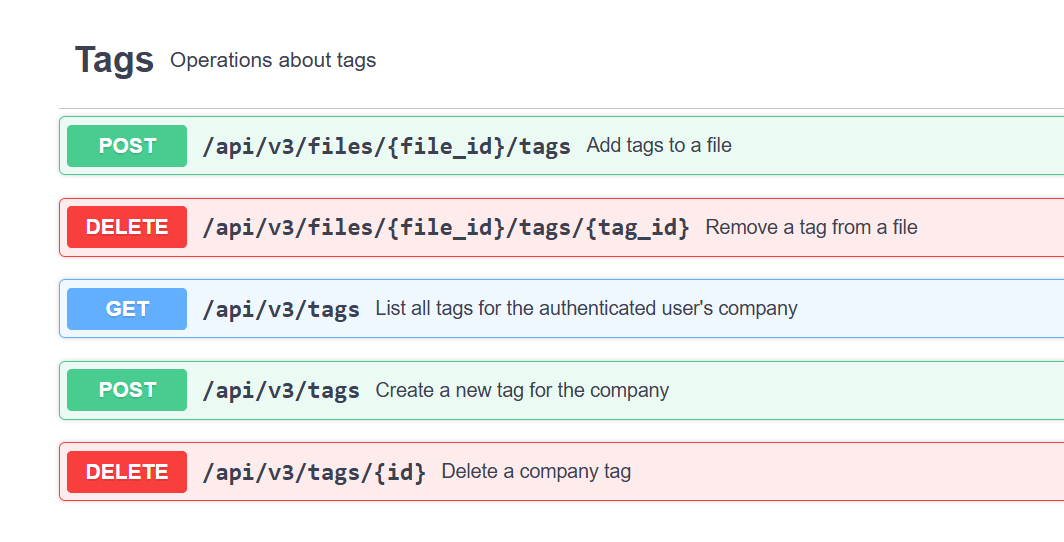
- ➡️ Each tag should include a meaningfull description to clarify its purpose and why a document should have it (see below auto-tagging capability)
How Tags Are Associated To Documents
There are several flexible ways of associating tags to a Document-
At API import, throught the POST /api/v3/files endpoint
- Parameter : “tags”: [], ( List of tag IDs to assign to the document on creation)
-
Through the dedicated association endpoint in the API for already uploaded documents
- POST /api/v3/files//tags
-
Automatically : During off-peak hours (typically at night), an automated process will try to apply, according to the tag name and description, the tags to Documents.
Note it is currently not possible to visually associate tags to documents in the UI in Paradigm.
Launching Auto-tagging Immediately
You don’t have to wait overnight for tags to be associated. If needed, you can trigger auto-tag association manually:- Go to the Document Administration Page:
/admin/embeddings/document/url. - Select one or more documents.
- From the action drop-down menu, choose “Tag document with knowledge graph.” ✅
Where to Find Tags
- Tags are displayed directly in the Document List page.
- They appear alongside each document, making it easy to identify content.
- You can also use them as filters to scope your search results on a specific set of documents.
Why Tags Matter
- Tags can improve the accuracy and speed of document search by scoping on them
- In the future, they will also power additional features across the platform (organization, automation, recommendations, etc.).