
Documentation Index

Fetch the complete documentation index at: https://docs.lighton.ai/llms.txt

Use this file to discover all available pages before exploring further.

Last updated: April 2026 — The Paradigm API evolves fast. Always check the latest API reference and prefer more recent cookbook entries when available.

Overview

A VC associate’s morning inbox is full of investment teasers — pitch decks, forwarded emails, data-room memos. Before any meeting gets booked, someone has to check the opportunity against the fund’s investment criteria: is it in the right sector? Is the ticket size in range? Is the timeline workable? This cookbook builds a pipeline that uploads the documents to Paradigm, extracts a structured analysis with a single document_search call, evaluates a rubric of nine screening criteria in code, and drafts a reply email whose tone matches the outcome. The pattern fits any rubric-based triage workflow where you want one LLM extraction plus deterministic scoring: procurement bid screening, grant-application triage, RFP filtering, M&A pipeline ranking.
This example is based on a production workflow for a GCC-focused investment firm. The nine criteria mirror that firm’s real policy — you can replace them wholesale by editing one Python module.

Demo

See the pipeline review a pitch deck and forwarded email, score them against nine criteria, and draft a reply email tuned to the outcome:

How It Works

  1. The user uploads one or more investment-opportunity documents (pitch deck, forwarded email, data-room memo).
  2. Each document is uploaded to Paradigm and polled until it reaches embedded status.
  3. A single agent-based document_search call extracts a structured, section-labelled analysis of the opportunity — company, geography, financials, deal terms, sector, IRR, syndicate.
  4. Nine deterministic criterion evaluators run in code, with no further API calls against the extracted analysis. Each returns MET or NOT MET with a short justification.
  5. The criteria are summed into one of four recommendation tiers (RECOMMEND, CONDITIONAL RECOMMEND, WEAK RECOMMEND, DO NOT RECOMMEND).
  6. A single chat/completions call drafts a reply email whose tone branches on the tier — a meeting request for a recommend, a follow-up with specific questions for a conditional, a diplomatic decline for a no.
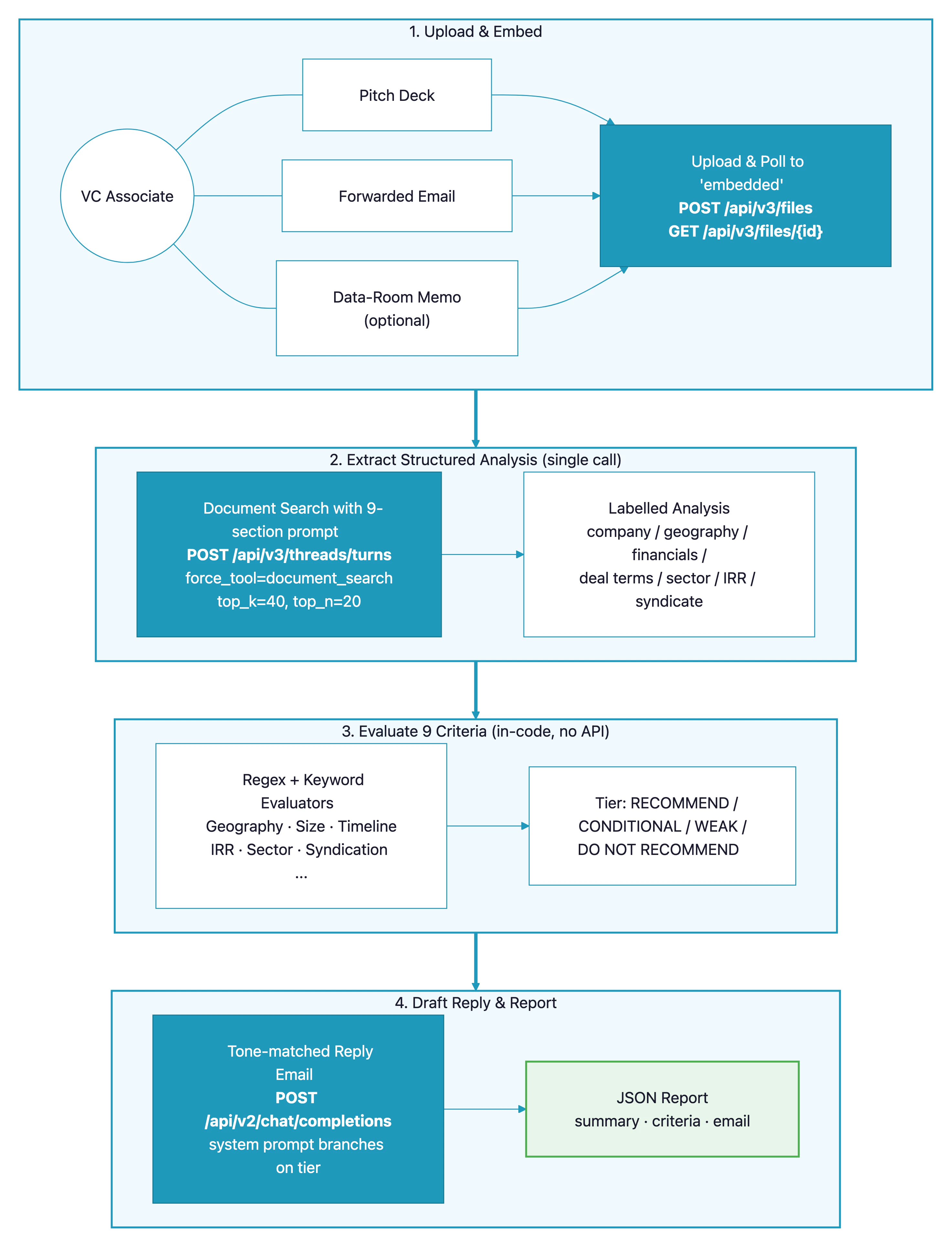
VC investment screening pipeline — architecture diagram showing document upload, single structured-analysis extraction, nine in-code criterion evaluators, and tone-matched reply-email drafting

Prerequisites

  • A Paradigm API key (get one here)
  • Python 3.10+
  • One or more investment-opportunity documents (sample PDF and DOCX included in the GitHub repo)

API Endpoints Used

EndpointPurpose in this pipeline
GET /api/v3/workspacesDiscover a target workspace to upload into
POST /api/v3/filesUpload pitch deck / email / memo (PDF or DOCX)
GET /api/v3/files/{id}Poll until each document finishes embedding
POST /api/v3/threads/turnsSingle structured-analysis extraction via document_search
POST /api/v2/chat/completionsDraft the tone-matched reply email

Step-by-Step Implementation

Step 1: Pick a Workspace and Upload

Paradigm’s /api/v3/files endpoint uploads into a specific workspace. Rather than hard-code one, we discover a sensible default at startup (personal → private → company → first available) and cache it on the client. Uploads are asynchronous: each file cycles pending → parsing → embedded, so we poll GET /api/v3/files/{id} until it’s ready.
def upload_documents(self, file_paths: list[str]) -> list[int]:
    """Upload files, wait for embedding, return the list of file IDs."""
    workspace_id = self._discover_workspace_id()
    file_ids = [self._upload_one(p, workspace_id) for p in file_paths]
    self._wait_for_embedding(file_ids)
    return file_ids

def _wait_for_embedding(self, file_ids: list[int]) -> None:
    deadline = time.time() + self.POLL_TIMEOUT  # 180s default
    pending = set(file_ids)
    while pending and time.time() < deadline:
        for fid in list(pending):
            status = self._get_file_status(fid)
            if status == "embedded":
                pending.discard(fid)
            elif status == "failed":
                raise RuntimeError(f"File {fid} failed to process on Paradigm.")
        if pending:
            time.sleep(self.POLL_INTERVAL)  # 3s
    if pending:
        raise TimeoutError(f"Files did not embed within {self.POLL_TIMEOUT}s")
For a small demo (1–3 files) the defaults are fine. For batch processing dozens of documents in parallel, raise POLL_TIMEOUT and lower POLL_INTERVAL, or move to a background-job pattern.

Step 2: Extract Everything in One Structured Query

Instead of making one call per criterion, we write a single “extraction prompt” that asks Paradigm to produce a section-labelled analysis covering every piece of information we care about. The prompt explicitly asks the model to write “not disclosed” when a section is missing — that way we can detect gaps deterministically downstream.
EXTRACTION_QUERY = """You are an expert venture-capital analyst. Provide a comprehensive,
structured analysis of this investment opportunity. Extract the following information
and name each section explicitly in your answer:

1. Target company name and legal entity structure.
2. Business model and core products / services.
3. Geographic presence and expansion plans, explicitly noting any GCC activity
   or joint-venture structures.
4. Financial position: current revenue and EBITDA, runway to profitability,
   funding requirements, dividend policy if mentioned.
5. Deal terms: proposed ticket size (USD), management fees, process timeline
   in weeks, round structure (primary vs secondary).
6. Sector and sub-sector classification.
7. Return projections, including IRR if disclosed.
8. Syndicate: is there a lead investor, and who are the co-investors.
9. Any mention of a group / strategic co-investment structure.

Be specific with numbers. If information is not disclosed in the document,
state "not disclosed" explicitly rather than omitting the section."""

Step 3: Force the Agent to Search, and Retrieve Broadly

The document_search tool on the V3 threads endpoint does the actual retrieval. Two flags matter here. First, force_tool="document_search" prevents the agent from answering from general knowledge — it must use the uploaded files. Second, we lift top_k and top_n well above the defaults so a single query can pull enough context to answer all nine sections at once.
SEARCH_TOP_K = 40   # chunks retrieved by embedding similarity
SEARCH_TOP_N = 20   # chunks kept after re-ranking

def document_search(self, query: str, file_ids: list[int]) -> str:
    payload = {
        "query": query,
        "force_tool": "document_search",
        "file_ids": file_ids,
        "tool_parameters": {
            "document_search": {
                "top_k": self.SEARCH_TOP_K,
                "top_n": self.SEARCH_TOP_N,
            }
        },
    }
    resp = requests.post(
        f"{self.base_url}/api/v3/threads/turns",
        headers=self.headers, json=payload, timeout=240,
    )
    resp.raise_for_status()
    return self._extract_assistant_text(resp.json())
/api/v3/threads/turns can return 202 Accepted for long-running requests. This demo keeps things synchronous — it raises instead of polling — which is fine for short opportunity documents. For 50-page data-room memos, implement a poll-on-202 loop.

Step 4: Define the Rubric as Data

Each criterion is one entry in a single module — label, evaluator function, threshold constants at the top. Keeping the rubric close to the top of src/pipeline.py means a fund operator can audit or edit it without touching the API plumbing.
# Size thresholds (USD millions)
SIZE_MIN = 5.0
SIZE_STRONG = 8.0

# Return threshold (percent)
IRR_MIN = 15.0

# Timeline thresholds (weeks)
TIMELINE_MIN = 8
TIMELINE_MIN_COINVEST = 3

# Sector targeting
TARGET_SECTORS = [
    "healthcare", "healthtech", "education", "edtech",
    "data economy", "saas", "energy transition", "cleantech", "industrials",
]
EXCLUDED_SECTORS = ["consumer", "traditional infrastructure"]

Step 5: Write Deterministic Evaluators

Each criterion is a small Python function that reads the extracted analysis and returns MET or NOT MET with an explanation. No further LLM calls — that keeps the rubric cheap, fast, and testable.
def _check_investment_size(analysis: str) -> CriterionResult:
    size = _ticket_size_usd_m(analysis)  # regex for "$Xm" near ticket/raise keywords
    if size >= SIZE_STRONG:
        return CriterionResult("MET", f"Ticket size ${size}m meets strong-preference threshold (>=${SIZE_STRONG}m).")
    if size >= SIZE_MIN:
        return CriterionResult("MET", f"Ticket size ${size}m meets minimum threshold (>=${SIZE_MIN}m).")
    if size > 0:
        return CriterionResult("NOT MET", f"Ticket size ${size}m below minimum threshold (${SIZE_MIN}m).")
    return CriterionResult("NOT MET", "Ticket size not disclosed.")


def _check_return_threshold(analysis: str) -> CriterionResult:
    irr = _first_irr_pct(analysis)
    low_risk = _has_any(analysis, ["low risk", "low-risk"])
    if irr >= IRR_MIN:
        return CriterionResult("MET", f"Projected IRR of {irr}% meets {IRR_MIN}% threshold.")
    if irr > 0 and low_risk:
        return CriterionResult("MET", f"Projected IRR of {irr}% below {IRR_MIN}% but justified as low-risk.")
    if irr > 0:
        return CriterionResult("NOT MET", f"Projected IRR of {irr}% below {IRR_MIN}% with no low-risk justification.")
    return CriterionResult("NOT MET", "Return projections / IRR not disclosed in the document.")
The evaluators deliberately treat “not disclosed” as NOT MET for most criteria — it’s a screening tool, and missing information is itself a signal. Change that behaviour per-criterion if your policy is more forgiving.

Step 6: Roll Up to a Recommendation Tier

Tally the criteria met, then pick one of four tiers. The break-points (7 and 5 out of 9) are the client’s real policy — tune for your own shop.
if met == total:
    recommendation = "RECOMMEND for further due diligence"
elif met >= 7:
    recommendation = "CONDITIONAL RECOMMEND — address the gaps before proceeding"
elif met >= 5:
    recommendation = "WEAK RECOMMEND — significant gaps, requires committee discussion"
else:
    recommendation = "DO NOT RECOMMEND — does not meet enough criteria"

Step 7: Draft a Tone-Matched Reply Email

The final call is a single Chat Completion. The system prompt is fixed (“5-8 sentences, no emojis, no marketing”), and the user prompt branches on the recommendation tier — a positive, a mixed, or a diplomatic-decline brief. This separation keeps the voice consistent while letting the content adapt to the outcome.
SYSTEM_PROMPT = """You are an associate at a venture-capital firm preparing a concise
reply email to a banker who forwarded an investment opportunity. Write in
professional but warm English. No emojis. No marketing language. Keep the
email to 5-8 short sentences. Return only the email body — no subject line,
no commentary before or after."""

def _reply_prompt(company, recommendation, met, total, failed_criteria):
    if "DO NOT RECOMMEND" in recommendation:
        brief = ("Draft a diplomatic decline that thanks the counterparty, "
                 "acknowledges the merit of the business, does not itemise every "
                 "reason for declining, and leaves the door open for future opportunities.")
    elif "CONDITIONAL" in recommendation or "WEAK" in recommendation:
        failed_text = ", ".join(failed_criteria) or "a few gaps"
        brief = (f"The following criteria were not met: {failed_text}. "
                 "Draft a reply that thanks the counterparty, expresses interest, asks "
                 "for a follow-up call to discuss the specific open points, and proposes "
                 "a couple of dates next week.")
    else:
        brief = ("Draft a positive reply that expresses strong interest and asks for "
                 "a meeting with the founders plus access to the data room.")
    return f"Company under review: {company}.\n{brief}"

Step 8: Assemble the Report

The final report bundles the extracted analysis, per-criterion results, the recommendation, and the drafted email into one JSON payload — ready for a CI step, a Slack notification, or a CRM write-back.
{
  "company": "MedSync Health FZ-LLC",
  "recommendation": "CONDITIONAL RECOMMEND — address the gaps before proceeding",
  "summary": { "met": 8, "total": 9, "failed_criteria": ["Return Threshold"] },
  "criteria": [
    { "key": "geography_structure", "label": "Geography / Structure",
      "status": "MET", "explanation": "GCC joint-venture / expansion structure identified." },
    { "key": "return_threshold", "label": "Return Threshold",
      "status": "NOT MET", "explanation": "Return projections / IRR not disclosed in the document." }
  ],
  "reply_email": "Dear Marcus, thank you for sharing the MedSync Health opportunity ...",
  "analysis": "1. Target company name and legal entity structure.\n   - Company Name: MedSync Health FZ-LLC ..."
}

Complete Code

Full source code

Clone the repository to run the complete pipeline with sample opportunity documents.

API Reference

Full Paradigm API documentation.

Customization

ParameterDescriptionDefaultAdjust when…
SIZE_MIN, SIZE_STRONGTicket size thresholds (USD millions)5.0, 8.0Your fund writes different cheque sizes
IRR_MINMinimum projected IRR15.0You have a different target return
TIMELINE_MIN, TIMELINE_MIN_COINVESTMinimum weeks to signing8, 3Your diligence cycle is longer or shorter
TARGET_SECTORS, EXCLUDED_SECTORSSector targetingHealthcare, edtech, SaaS, cleantech, industrialsYour thesis lives in different sectors
EXTRACTION_QUERY (in src/pipeline.py)Structured prompt9 named sectionsYou want to extract a different rubric
SEARCH_TOP_K, SEARCH_TOP_N (in src/paradigm_client.py)Retrieval depth40, 20Documents are very long (raise) or very short (lower)
SYSTEM_PROMPT (in src/report.py)Reply-email voiceWarm professional English, 5–8 sentencesYour firm has a distinctive tone
Tier break-points (in run_screening)How many criteria for each tier9 / 7 / 5 / belowYour risk appetite differs

Adding Your Own Criterion

Each criterion is a small function plus an entry in the order and label maps. Steps to add one:
  1. Add the key to CRITERIA_ORDER and a label to CRITERION_LABELS.
  2. Write a _check_<name> function that returns a CriterionResult.
  3. Register it in _EVALUATORS.
  4. (Optional) Add anything the new check needs to EXTRACTION_QUERY so the analysis includes it.
def _check_founder_background(analysis: str) -> CriterionResult:
    lc = analysis.lower()
    if _has_any(analysis, ["ex-founder", "second-time founder", "prior exit"]):
        return CriterionResult("MET", "Founder has prior entrepreneurial experience.")
    return CriterionResult("NOT MET", "No prior founder experience mentioned.")

Best Practices

  1. Extract once, evaluate many times — a single big extraction query is cheaper and more consistent than one call per criterion. Ask the LLM for everything up front, then apply rubric logic in code where it’s deterministic and testable.
  2. Ask the model to label gaps explicitly — the phrase “state ‘not disclosed’ explicitly rather than omitting the section” in the extraction prompt is load-bearing. It turns missing information into a detectable signal instead of silently passing through.
  3. Keep evaluators deterministic — regex and keyword matching on an LLM-extracted structured analysis gives you auditable decisions. If a deal is rejected, the evaluator name and explanation tell you exactly why.
  4. Branch the reply-email system prompt on the outcome — keep the voice constant, change the content. Three concise branches (positive / mixed / decline) produce consistently professional emails without brittle templating.
  5. Keep thresholds and sector lists at the top of the pipeline module — your policy will evolve; your operators shouldn’t need to read Python to adjust a number.
  6. Lift top_k / top_n for rich extraction queries — the defaults are tuned for short Q&A. When you ask for nine sections in one breath, give the retriever enough context to find it all.