
Documentation Index

Fetch the complete documentation index at: https://docs.lighton.ai/llms.txt

Use this file to discover all available pages before exploring further.

Last updated: April 2026 — The Paradigm API evolves fast. Always check the latest API reference and prefer more recent cookbook entries when available.

Overview

Legal teams spend hours reviewing incoming NDAs against an internal policy — checking that liability is properly capped, that disclosure carve-outs exist, that the return-of-information clause has the right exceptions. This cookbook shows how to build a pipeline that uploads an NDA to Paradigm, runs a configurable set of legal controls over it, and for every failing control proposes a rewording sourced from a previously signed NDA (or, if none matches, a default template). The pattern generalises to any contract-review workflow: MSAs, supplier agreements, DPAs, employment contracts. Anywhere a policy check and a suggested fix would save a reviewer time.
This example is based on a production workflow used by a French asset manager to review NDAs incoming from M&A processes. The four controls shown here match the client’s real compliance rules — you can swap in your own by editing one Python list.

Demo

See the pipeline reviewing a sample NDA, failing two of four controls, and proposing rewordings pulled from a previously signed reference:

How It Works

  1. The user uploads an incoming NDA, plus zero or more previously signed reference NDAs.
  2. Each document is uploaded to Paradigm and indexed via embedding.
  3. The counterparty (Target Company) is extracted from each document and used to match the incoming NDA with the most similar reference.
  4. Four compliance controls are run against the incoming NDA. Each control is a small tree of yes/no legal questions — each question is answered by combining an agent-based Document Search (to locate the clause) with a structured Chat Completion (to classify it and return the supporting quote).
  5. For every control that fails, the same extraction flow is applied to the matched reference NDA to propose a rewording. If no reference matched, a default template is used instead.
  6. Results are compiled into a JSON report with per-control status, extracted quotes, and proposed rewordings.
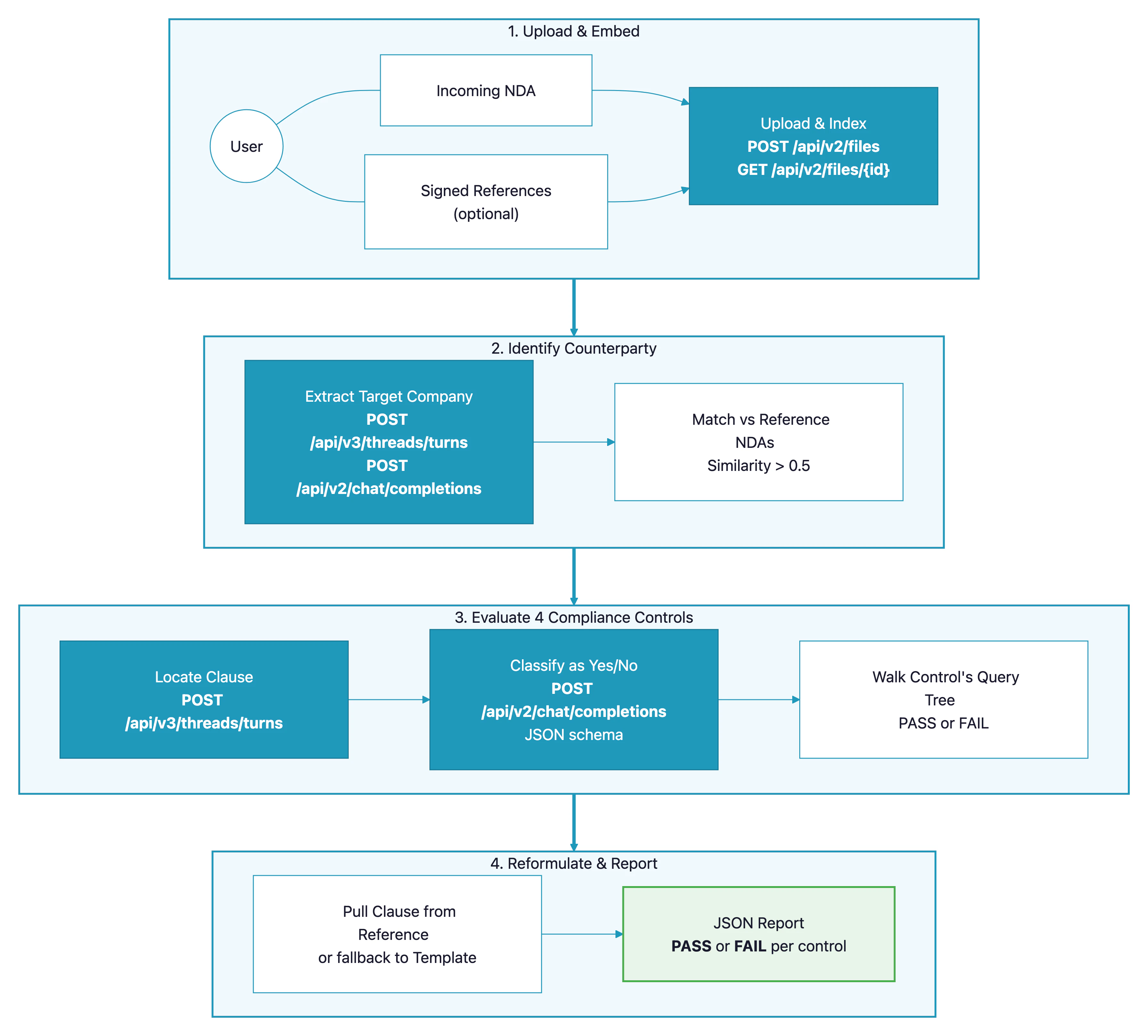
NDA compliance review pipeline — architecture diagram showing upload and embedding, counterparty identification, four-control evaluation, and reformulation with JSON report output

Prerequisites

  • A Paradigm API key (get one here)
  • Python 3.10+
  • At least one NDA to review (sample NDAs are included in the GitHub repo)
  • Optional: previously signed NDAs to use as reformulation sources

API Endpoints Used

EndpointPurpose in this pipeline
POST /api/v2/filesUpload an NDA (PDF or DOCX) to Paradigm
GET /api/v2/files/{id}Poll until the document finishes embedding
POST /api/v3/threads/turnsAgent-based document search (RAG) to locate specific clauses
POST /api/v2/chat/completionsStructured JSON classification using a JSON-schema response format

Step-by-Step Implementation

Step 1: Upload and Wait for Embedding

Unlike upload-session–based workflows, NDAs are uploaded as single files via POST /api/v2/files. Because Document Search requires the document to be fully embedded, we poll GET /api/v2/files/{id} until its status flips to embedded.
def upload_and_embed(self, file_path: str) -> str:
    """Upload a single file and block until it is embedded."""
    with open(file_path, "rb") as fh:
        resp = requests.post(
            f"{self.base_url}/api/v2/files",
            headers={"Authorization": f"Bearer {self.api_key}"},
            files={"file": fh},
            timeout=120,
        )
    file_id = resp.json()["id"]

    deadline = time.time() + 180
    while time.time() < deadline:
        status = self.get_file(file_id).get("status")
        if status == "embedded":
            return str(file_id)
        if status == "fail":
            raise ParadigmError(f"Embedding failed for file {file_id}")
        time.sleep(2.0)
    raise ParadigmError(f"Timeout waiting for file {file_id} to embed")
Every compliance check comes down to the same two-step pattern: first a Document Search surfaces the relevant clause, then a structured Chat Completion classifies it and returns the supporting quote. The JSON schema guarantees we always get a predictable shape back.
def _ask_yes_no(client, file_id: str, question: str) -> QueryResult:
    # 1. Find the passage that discusses this topic.
    search_query = f"Dans ce document, dans quelle section se trouve la clause qui parle de : {question}"
    passage = client.ask_question(file_id, search_query)

    # 2. Classify the passage against the question and return the exact quote.
    classify_query = (
        f"Voici les informations récupérées du document NDA :\n{passage}\n\n"
        f"Extrais la phrase exacte du document qui correspond à la requête suivante "
        f"et indique si la clause est présente et affirmative. Requête : {question}"
    )
    schema = {
        "type": "object",
        "properties": {
            "extracted_text": {"type": "string"},
            "is_true": {"type": "boolean"},
        },
        "required": ["extracted_text", "is_true"],
        "additionalProperties": False,
    }
    answer = client.structured_completion(classify_query, schema=schema)
    return QueryResult(
        question=question,
        is_true=bool(answer["is_true"]),
        extracted_text=answer["extracted_text"].strip(),
    )
The queries are in French because the client’s NDAs are reviewed by French-speaking lawyers who framed them that way originally. Paradigm handles French natively — translate them to your own language if that makes more sense for your team.

Step 3: Use force_tool and response_format for Structure

Two Paradigm features do the heavy lifting here. First, force_tool: "document_search" on the V3 threads endpoint guarantees the model does a RAG lookup over the specified file rather than answering from general knowledge:
def ask_question(self, file_id: str, question: str) -> str:
    payload = {
        "ml_model": self.model,
        "query": question,
        "force_tool": "document_search",
        "file_ids": [int(file_id)],
    }
    resp = requests.post(
        f"{self.base_url}/api/v3/threads/turns",
        headers=self._json_headers(),
        json=payload,
        timeout=180,
    )
    return _extract_v3_answer(resp.json())
Second, response_format with a JSON schema on chat/completions guarantees the classification answer is a valid, parseable object — no regex-wrangling of free-text responses:
payload = {
    "model": self.model,
    "messages": [
        {"role": "system", "content": self._JSON_SYSTEM_PROMPT},
        {"role": "user", "content": query},
    ],
    "temperature": 0.1,
    "max_tokens": 800,
    "response_format": {
        "type": "json_schema",
        "json_schema": {"name": "response", "schema": schema, "strict": True},
    },
}

Step 4: Model the Controls as Query Trees

Each compliance control is a tree of yes/no questions with branching rules. Keeping the controls as data — not code — makes them trivial to audit, tune, or hand off to a non-engineer.
CONTROLS = [
    {
        "number": "1",
        "name": "Liability of the receiving party",
        "queries": [
            {"id": "q1", "text": "Is there a liability clause for unauthorised disclosure?"},
            {"id": "q2", "text": "Is liability capped to direct damages only?"},
            {"id": "q3", "text": "Is the NDA governed by French law?"},
        ],
        "default_templates": {
            "q2": "to indemnify the Counterparty ... against all direct claims ...",
            "q3": "This Agreement is subject to French law ...",
        },
    },
    # ... three more controls
]
The branching logic lives in _run_control. Control 1 for example reads: “if a liability clause exists, then it must be capped to direct damages; otherwise the NDA must be governed by French law.”
if control["number"] == "1":
    q1 = ask("q1")
    if q1.is_true:
        q2 = ask("q2")
        if not q2.is_true:
            status, failed_qid = "FAIL", "q2"
    else:
        q3 = ask("q3")
        if not q3.is_true:
            status, failed_qid = "FAIL", "q3"

Step 5: Extract the Counterparty for Matching

Before running controls we identify the Target Company in the NDA. In an M&A context three parties may appear — the Receiving Party (the buyer), a Financial Advisor intermediary, and the Target Company whose information is being shared. We want the Target Company, not the other two. A carefully-written prompt plus a one-field JSON schema keeps the output clean:
schema = {
    "type": "object",
    "properties": {
        "target_company": {
            "type": "string",
            "description": (
                "Nom commercial de la société cible (Target Company). "
                "Exclure la Receiving Party et le Financial Advisor intermédiaire."
            ),
        },
    },
    "required": ["target_company"],
    "additionalProperties": False,
}
Once we have the counterparty for every document, we pair the incoming NDA with its closest match among the references using difflib.SequenceMatcher (a drop-in stand-in for PostgreSQL trigram similarity).

Step 6: Reformulate Failing Clauses

When a control fails, we propose a fix. The fallback chain is: “try to pull the equivalent clause from the matched reference NDA; if nothing usable comes back, use a pre-written template.”
def _reformulate(client, question, default_template, reference_file_id):
    if reference_file_id:
        result = _ask_yes_no(client, reference_file_id, question)
        if result.extracted_text:
            return result.extracted_text, "reference"
    return default_template.strip(), "template"
This means the suggested reword is usually drawn from language the counterparty has already signed — much easier to agree on than a generic template clause.

Step 7: Compile the Report

The final report bundles the counterparty, the matched reference, and one ControlResult per control (status, queries with quotes, proposed reformulation). A top-level summary makes it trivial to wire the review into a CI check or a dashboard.
{
  "nda_filename": "NDA - Project Kairos.docx",
  "counterparty": "Nexora Group",
  "reference": {
    "filename": "NDA - Project Kairos - Livana (Meridia AM signed).pdf",
    "counterparty": "Nexora Group"
  },
  "summary": {
    "total_controls": 4, "passed": 2, "failed": 2,
    "pass_rate": 50.0, "status": "FAIL"
  },
  "controls": [
    {
      "number": "1",
      "name": "Liability of the receiving party",
      "status": "FAIL",
      "queries": [
        {"id": "q1", "is_true": true,  "extracted_text": "You shall be responsible ..."},
        {"id": "q2", "is_true": false, "extracted_text": ""}
      ],
      "reformulation": "You shall be responsible ... for any direct damages ...",
      "reformulation_source": "reference"
    }
  ]
}

Complete Code

Full source code

Clone the repository to run the complete pipeline with sample NDAs.

API Reference

Full Paradigm API documentation.

Customization

ParameterDescriptionDefaultAdjust when…
CONTROLS (in src/pipeline.py)List of compliance controls, each with a query tree and default templates4 M&A NDA controlsYou have different policy requirements
match_reference_nda(threshold=...)Counterparty similarity threshold0.5Your reference library has many near-duplicates (raise it) or very few entries (lower it)
model (in ParadigmClient)Paradigm model used for search and completionalfred-ft5You need different speed or quality tradeoffs
temperatureCompletion determinism0.1You want more creative rewordings from the template fallback
System prompt for _JSON_SYSTEM_PROMPTLanguage / output-format instructionsFrench, JSON-onlyYour documents or team work in another language

Adding Your Own Control

Each control is one entry in the CONTROLS list. Steps to add one:
  1. Define the queries — one yes/no legal question per node in your decision tree.
  2. Add branching logic to _run_control — under which combination of answers is the control PASS vs FAIL, and which query’s template is used for reformulation.
  3. Write a default template — the fallback wording used when no reference NDA matches.
{
    "number": "5",
    "name": "Term and termination",
    "queries": [
        {"id": "q1", "text": "Does the NDA specify a fixed duration of confidentiality?"},
    ],
    "default_templates": {
        "q1": "The obligations under this Agreement shall survive for a period of five (5) years ...",
    },
}

Best Practices

  1. Keep controls as data, not code — putting the query text and templates in a list (not spread through functions) makes compliance review a task your legal team can audit directly. Small wins for lawyers are big wins for the pipeline.
  2. Always use force_tool: "document_search" for clause lookups — it forces Paradigm to cite the actual document rather than rely on general knowledge, which matters enormously for legal review.
  3. Use response_format with a JSON schema for classification — free-text parsing of “yes/no plus quote” is fragile; schema-enforced JSON is bulletproof.
  4. Prefer reference-sourced rewordings over templates — language the counterparty has already signed is far easier to accept than a generic template clause. Fall back to templates only when no reference matched.
  5. Match counterparties, not filenames — extracting the Target Company before matching means you can use an inventory of hundreds of signed NDAs without worrying about how they were named. A loose similarity threshold (0.5) is forgiving of naming variations.
  6. Validate the extracted counterparty — M&A NDAs often involve three parties; a cheap schema-backed extractor with explicit “exclude these roles” rules in the description field saves expensive re-runs.