

Last updated: April 2026 — The Paradigm API evolves fast. Always check the latest API reference and prefer more recent cookbook entries when available.
Overview
The content generator module uses AI to generate attractive, professional job advertisements based on job specifications you provide. It takes basic job information and produces a complete, formatted job posting ready for publication.This case is an example, feel free to replicate it for any type of content generation.
Note
The examples in this documentation use a local Flask web server. Be aware of this if you want to deploy to production.
This example was created using an HTML frontend that sends the variables to the backend.
How It Works
- The user logs in to the front-end interface.
- The user provides the job information (title, department, experience, salary, etc.).
- The system uses a structured prompt with the job-post template + the variables provided by the user.
- The LLM generates a complete job posting.
- The formatted job post in the requested language is displayed on the front end.
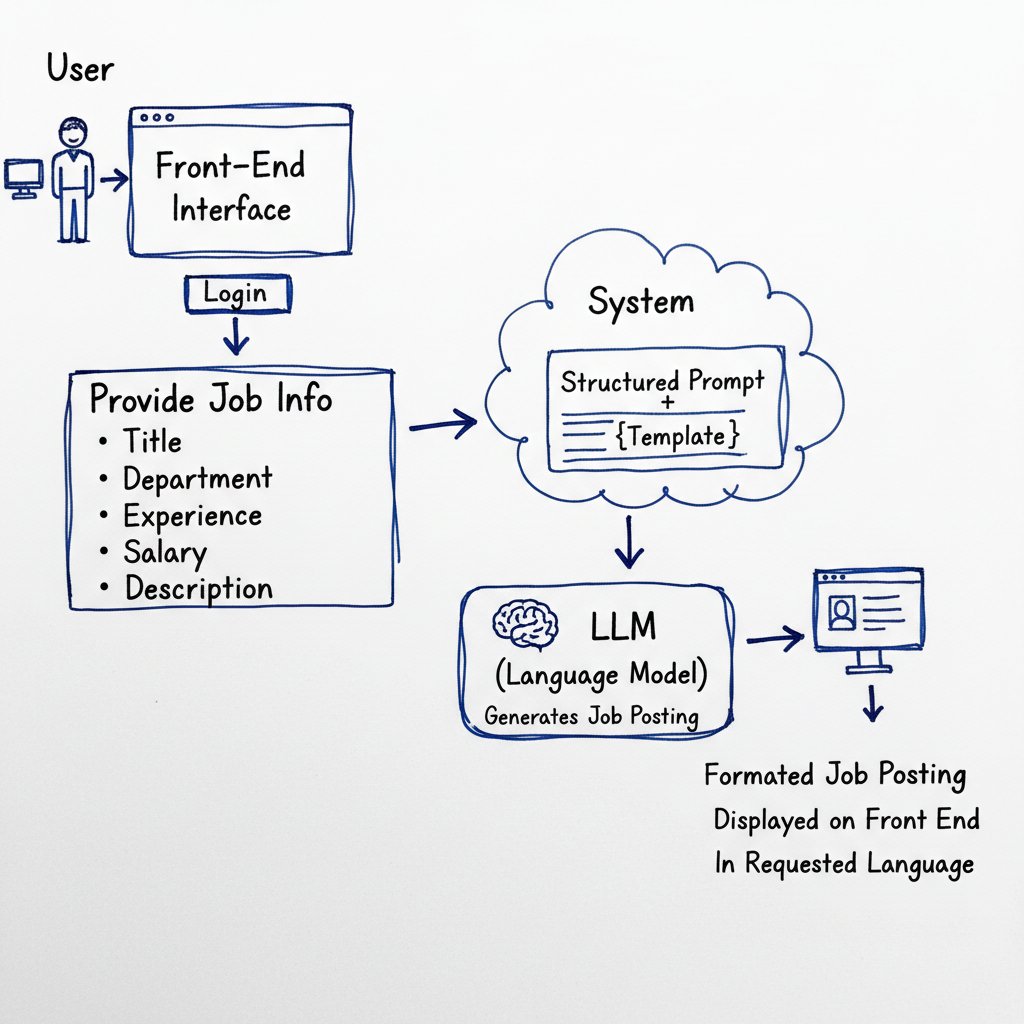
API Endpoints Used
| Endpoint | Purpose |
|---|---|
POST /chat/completions | Generate job advertisement |
Step-by-Step Implementation
Step 1: Initialize the Service
import requests
from typing import Dict, Any, List

class AdsService:
    def __init__(self, api_key: str):
        self.api_key = api_key
        self.headers = {
            "Authorization": f"Bearer {api_key}",
            "Content-Type": "application/json"
        }

        # API configuration
        self.chat_url = "https://paradigm.lighton.ai/api/v2/chat/completions"
        self.model = "alfred-ft5"
        self.max_tokens = 2000
        self.temperature = 0.7  # Creative but consistent
Step 2: Create the Generation Prompt
def _create_prompt(self, job_data: Dict[str, Any]) -> str:
    """
    Create prompt for job ad generation.

    Args:
        job_data: Dictionary containing job information

    Returns:
        Formatted prompt string
    """
    # Extract job data
    job_title = job_data.get('jobTitle', '')
    department = job_data.get('department', '')
    contract_type = job_data.get('contractType', '')
    experience = job_data.get('experience', '')
    salary_min = job_data.get('salaryMin', '')
    salary_max = job_data.get('salaryMax', '')
    benefits = job_data.get('benefits', [])
    job_description = job_data.get('jobDescription', '')
    language = job_data.get('language', 'English')

    # Job ad template
    template = """
**[JOB TITLE]**

**Department: [DEPARTMENT]**
**Contract: [CONTRACT_TYPE]**
**Experience: [EXPERIENCE]**
**Salary: [SALARY_RANGE]**

**Job Description:**
[Detailed and engaging description of the position]

**Key Responsibilities:**
- [Responsibility 1]
- [Responsibility 2]
- [Responsibility 3]

**Required Qualifications:**
- [Qualification 1]
- [Qualification 2]
- [Qualification 3]

**Benefits & Perks:**
[List of benefits]

**Why Join Us:**
[Compelling reasons to join]

**How to Apply:**
[Call to action]
"""

    # Build the prompt
    prompt = f"""You are a professional job offer generator. Use this template:

TEMPLATE:
{template}

JOB INFORMATION:
- Job Title: {job_title}
- Department: {department}
- Contract Type: {contract_type}
- Experience Level: {experience}"""

    if salary_min and salary_max:
        prompt += f"\n- Salary Range: {salary_min}€ - {salary_max}€"
    elif salary_min:
        prompt += f"\n- Minimum Salary: {salary_min}€"

    if benefits:
        prompt += f"\n- Benefits: {', '.join(benefits)}"

    if job_description:
        prompt += f"\n- Additional Context: {job_description}"

    prompt += f"""

INSTRUCTIONS:
1. Write the entire job ad in {language}
2. Translate ALL section titles to {language}
3. Replace all [PLACEHOLDERS] with actual information
4. Create an engaging and attractive job posting
5. Use a professional yet warm tone
6. Emphasize career growth and company culture
7. End with a compelling call to action

Generate the complete job offer in {language}:"""

    return prompt
Step 3: Generate Job Advertisement
def generate_job_ad(self, job_data: Dict[str, Any]) -> str:
    """
    Generate a job offer advertisement.

    Args:
        job_data: Dictionary containing:
            - jobTitle: Job title (required)
            - department: Department name (required)
            - contractType: Contract type (required)
            - experience: Experience level (required)
            - salaryMin: Minimum salary (optional)
            - salaryMax: Maximum salary (optional)
            - benefits: List of benefits (optional)
            - jobDescription: Additional context (optional)
            - language: Output language (default: English)

    Returns:
        Generated job advertisement as string
    """
    # Validate required fields
    is_valid, error = self.validate_job_data(job_data)
    if not is_valid:
        raise ValueError(error)

    # Create prompt
    prompt = self._create_prompt(job_data)

    payload = {
        "model": self.model,
        "messages": [
            {"role": "user", "content": prompt}
        ],
        "max_tokens": self.max_tokens,
        "temperature": self.temperature
    }

    try:
        response = requests.post(
            self.chat_url,
            headers=self.headers,
            json=payload,
            timeout=150
        )

        if response.status_code == 200:
            data = response.json()
            if "choices" in data and data["choices"]:
                return data["choices"][0]["message"]["content"]
            else:
                return self._generate_fallback_ad(job_data)
        else:
            return self._generate_fallback_ad(job_data)

    except Exception as e:
        return self._generate_fallback_ad(job_data)
Step 4: Validate Input Data
def validate_job_data(self, data: Dict[str, Any]) -> tuple:
    """
    Validate job data before generation.

    Args:
        data: Job data to validate

    Returns:
        Tuple of (is_valid, error_message)
    """
    required_fields = ['jobTitle', 'department', 'contractType', 'experience']

    for field in required_fields:
        if not data.get(field):
            return False, f'The field {field} is required'

    # Validate salary
    if data.get('salaryMin'):
        try:
            salary_min = float(data['salaryMin'])
            if salary_min < 0:
                return False, 'Minimum salary must be >= 0'
        except ValueError:
            return False, 'Minimum salary must be a valid number'

    if data.get('salaryMax'):
        try:
            salary_max = float(data['salaryMax'])
            if salary_max < 0:
                return False, 'Maximum salary must be >= 0'

            if data.get('salaryMin'):
                if salary_max < float(data['salaryMin']):
                    return False, 'Maximum salary must be > minimum salary'
        except ValueError:
            return False, 'Maximum salary must be a valid number'

    return True, ""
Step 5: Fallback Generator
def _generate_fallback_ad(self, job_data: Dict[str, Any]) -> str:
    """Generate fallback ad when API fails."""
    job_title = job_data.get('jobTitle', 'Position')
    department = job_data.get('department', 'General')
    contract_type = job_data.get('contractType', 'Full-time')
    experience = job_data.get('experience', 'Not specified')
    salary_min = job_data.get('salaryMin', '')
    salary_max = job_data.get('salaryMax', '')
    benefits = job_data.get('benefits', [])

    # Format salary
    salary_range = ""
    if salary_min and salary_max:
        salary_range = f"{int(float(salary_min)):,}€ - {int(float(salary_max)):,}€"
    elif salary_min:
        salary_range = f"From {int(float(salary_min)):,}€"

    ad = f"""**{job_title}**

**Department:** {department}
**Contract Type:** {contract_type}
**Experience Level:** {experience}"""

    if salary_range:
        ad += f"\n**Salary:** {salary_range}"

    ad += f"""

**Job Description:**
We are seeking a talented professional for our {job_title} position in the {department} department.

**Key Responsibilities:**
- Lead and execute key initiatives
- Collaborate with cross-functional teams
- Drive innovation and continuous improvement

**Required Qualifications:**
- {experience} of relevant experience
- Strong problem-solving skills
- Excellent communication abilities"""

    if benefits:
        ad += "\n\n**Benefits & Perks:**"
        for benefit in benefits:
            ad += f"\n- {benefit}"

    ad += """

**Why Join Us:**
- Work on impactful projects
- Collaborative work environment
- Professional development opportunities

**How to Apply:**
Submit your application and join our team!"""

    return ad
Complete Usage Example
# Initialize service
ads = AdsService(api_key="your-api-key")

# Define job data
job_data = {
    'jobTitle': 'Senior Software Engineer',
    'department': 'Engineering',
    'contractType': 'CDI',  # Permanent contract
    'experience': '5+ years',
    'salaryMin': '55000',
    'salaryMax': '75000',
    'benefits': [
        'Remote work options',
        'Health insurance',
        'Stock options',
        '25 days vacation',
        'Learning budget'
    ],
    'jobDescription': 'Join our AI team to build next-generation NLP products. You will work on cutting-edge language models and help shape our technical roadmap.',
    'language': 'English'
}

# Generate the job ad
job_ad = ads.generate_job_ad(job_data)
print(job_ad)

# Generate in French
job_data['language'] = 'French'
job_ad_fr = ads.generate_job_ad(job_data)
print("\n--- French Version ---\n")
print(job_ad_fr)
Flask Route Integration
from flask import Blueprint, request, jsonify

ads_bp = Blueprint('ads', __name__)
ads_service = None

def init_ads_service(api_key: str):
    global ads_service
    ads_service = AdsService(api_key)

@ads_bp.route('/generate', methods=['POST'])
def generate_ad():
    """Generate a job advertisement."""
    data = request.json

    # Validate
    is_valid, error = ads_service.validate_job_data(data)
    if not is_valid:
        return jsonify({'error': error}), 400

    # Generate
    job_ad = ads_service.generate_job_ad(data)

    return jsonify({
        'ad': job_ad,
        'status': 'success'
    })

@ads_bp.route('/validate', methods=['POST'])
def validate():
    """Validate job data before generation."""
    data = request.json
    is_valid, error = ads_service.validate_job_data(data)

    return jsonify({
        'valid': is_valid,
        'error': error if not is_valid else None
    })
Input Parameters
| Parameter | Type | Required | Description |
|---|---|---|---|
jobTitle | string | Yes | Job title |
department | string | Yes | Department name |
contractType | string | Yes | Contract type (CDI, CDD, etc.) |
experience | string | Yes | Experience level |
salaryMin | string | No | Minimum salary |
salaryMax | string | No | Maximum salary |
benefits | array | No | List of benefits |
jobDescription | string | No | Additional context |
language | string | No | Output language (default: English) |
Best Practices
- Provide detailed context in jobDescription for better results
- List specific benefits to make the ad more attractive
- Use appropriate language for your target audience
- Review generated content before publishing
- Customize the template for your company’s brand voice