> ## Documentation Index
> Fetch the complete documentation index at: https://docs.lighton.ai/llms.txt
> Use this file to discover all available pages before exploring further.
# Procurement Document Verification
> Automate multi-document verification by extracting and cross-referencing fields across uploaded documents using Paradigm's Document Search and Chat Completions APIs.
**Last updated: April 2026** — The Paradigm API evolves fast. Always check the [latest API reference](/en/developer-resources/api-fundamentals/quick-guide) and prefer more recent cookbook entries when available.
## Overview
Verifying that information is consistent across a set of related documents — procurement forms, contracts, bank details, identity declarations — is tedious, error-prone, and expensive when done manually. This cookbook shows how to build an automated verification pipeline that uploads documents to Paradigm, extracts specific fields using Document Search, and cross-references them using Chat Completions with structured prompts.
The pattern is applicable to any multi-document verification workflow: compliance audits, insurance claims processing, loan applications, supplier onboarding, and more.
This example is based on a real production use case verifying French public procurement forms (DC4). The pattern generalizes to any scenario where you need to check consistency across multiple documents.
## Demo
See the pipeline in action — uploading documents, running automated checks, and generating a verification report:
## How It Works
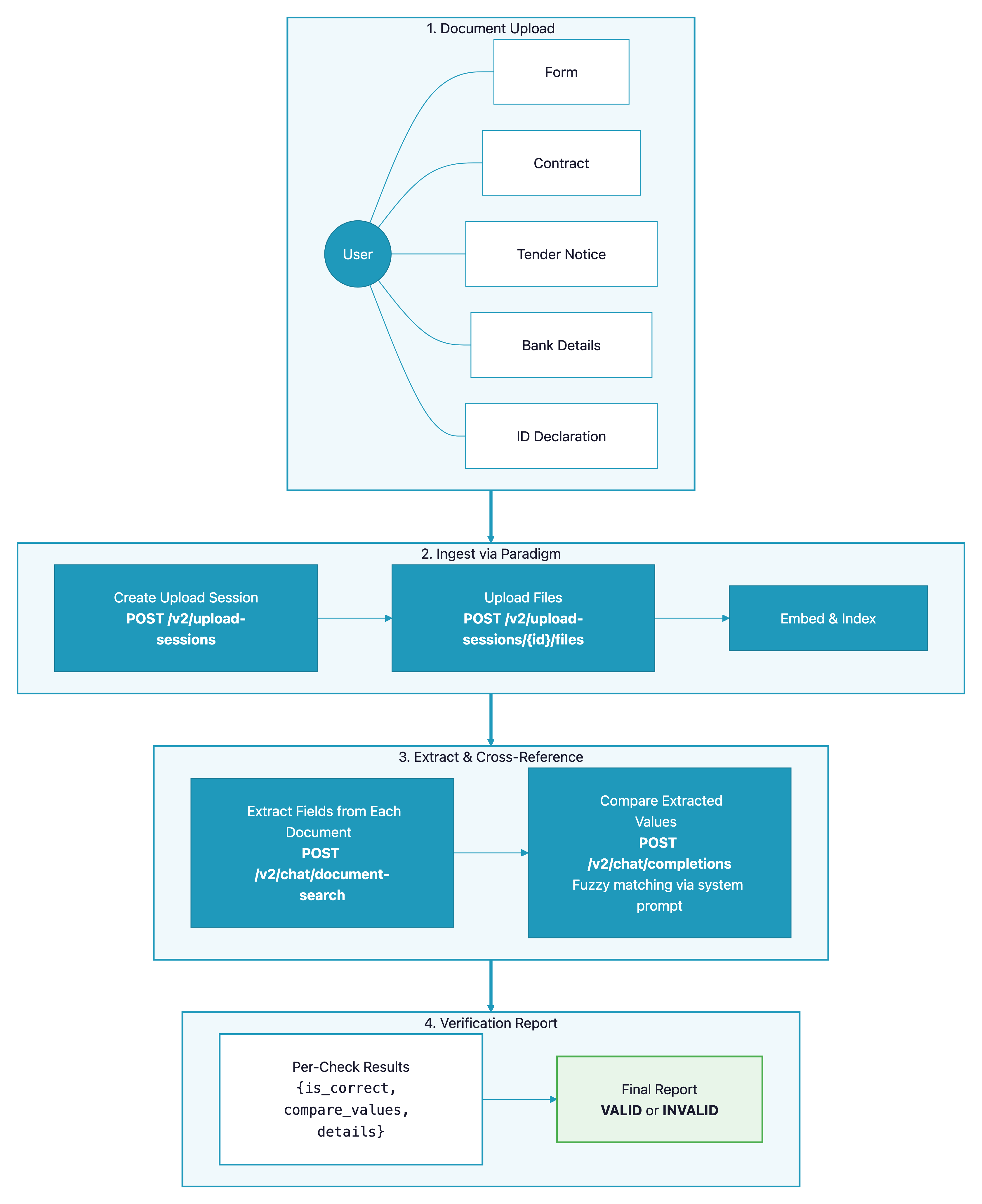
1. The user uploads a set of related documents (e.g., a form, a contract, bank details, an identity declaration).
2. Documents are ingested into Paradigm via the Upload Sessions API.
3. For each verification check, specific fields are extracted from the relevant documents using Document Search.
4. Extracted fields are compared using Chat Completions with a structured system prompt that handles fuzzy matching (typos, formatting differences, abbreviations).
5. Each check returns a structured result: `is_correct`, the compared values, and details explaining the decision.
6. All results are compiled into a verification report.
 ## Prerequisites
* A Paradigm API key ([get one here](/en/developer-resources/api-fundamentals/quick-guide))
* Python 3.10+
* Documents to verify (sample documents are included in the GitHub repo)
## API Endpoints Used
| Endpoint | Purpose in this pipeline |
| ------------------------------------- | ---------------------------------------------------- |
| `POST /v2/upload-sessions` | Create a session to upload documents |
| `POST /v2/upload-sessions/{id}/files` | Upload individual files to the session |
| `POST /v2/chat/document-search` | Extract specific fields from uploaded documents |
| `POST /v2/chat/completions` | Cross-reference extracted fields with fuzzy matching |
## Step-by-Step Implementation
### Step 1: Set Up the Paradigm Client
Create a wrapper around the Paradigm API. This client handles authentication, document upload, field extraction, and cross-referencing.
```python theme={null}
import requests
from typing import Optional
class ParadigmClient:
"""Client for interacting with the Paradigm API."""
def __init__(self, api_key: str, base_url: str = "https://paradigm.lighton.ai"):
self.api_key = api_key
self.base_url = base_url
self.headers = {
"Authorization": f"Bearer {api_key}",
"Content-Type": "application/json"
}
```
### Step 2: Upload Documents
Documents must be uploaded to Paradigm before they can be queried. The Upload Sessions API manages the ingestion pipeline — you create a session, upload files to it, then close the session to trigger embedding.
```python theme={null}
def create_upload_session(self) -> dict:
"""Create a new upload session for document ingestion."""
response = requests.post(
f"{self.base_url}/api/v2/upload-sessions",
headers=self.headers,
json={"pipeline": "v2.2.1"}
)
response.raise_for_status()
return response.json()
def upload_file(self, session_id: str, file_path: str) -> dict:
"""Upload a single file to an existing upload session."""
with open(file_path, "rb") as f:
response = requests.post(
f"{self.base_url}/api/v2/upload-sessions/{session_id}/files",
headers={"Authorization": f"Bearer {self.api_key}"},
files={"file": f}
)
response.raise_for_status()
return response.json()
def close_upload_session(self, session_id: str) -> dict:
"""Close the session to trigger document embedding."""
response = requests.post(
f"{self.base_url}/api/v2/upload-sessions/{session_id}/close",
headers=self.headers
)
response.raise_for_status()
return response.json()
```
Documents must be fully embedded before they can be queried. Embedding time depends on document size and complexity — typically a few seconds to a few minutes.
### Step 3: Extract Fields with Document Search
Once documents are embedded, use Document Search to extract specific fields. The `query` parameter is a natural language question — Paradigm searches the document and returns the relevant content.
```python theme={null}
def search_document(
self,
file_ids: list[str],
query: str,
tool: str = "DocumentSearch"
) -> dict:
"""Extract specific information from uploaded documents.
Args:
file_ids: Paradigm file IDs to search within.
query: Natural language query describing what to extract.
tool: "DocumentSearch" for text, "VisionDocumentSearch" for scanned/image docs.
"""
payload = {
"model": "alfred-4.2",
"query": query,
"file_ids": file_ids,
"tool": tool
}
response = requests.post(
f"{self.base_url}/api/v2/chat/document-search",
headers=self.headers,
json=payload,
timeout=150
)
response.raise_for_status()
return response.json()
```
Example queries for extracting fields:
```python theme={null}
# Extract the buyer's name from a procurement form
result = client.search_document(
file_ids=[form_file_id],
query="What is the name of the public buyer (pouvoir adjudicateur)?"
)
# Extract the contract reference number from a tender notice
result = client.search_document(
file_ids=[tender_notice_id],
query="What is the market reference number?"
)
# Extract bank details from a scanned document
result = client.search_document(
file_ids=[bank_doc_id],
query="What is the IBAN number?",
tool="VisionDocumentSearch" # Use vision for scanned/image documents
)
```
### Step 4: Cross-Reference Fields with Chat Completions
This is the core of the verification pipeline. After extracting the same field from two different documents, use Chat Completions with a structured system prompt to compare them. The system prompt handles real-world messiness: typos, formatting differences, abbreviations, missing accents.
```python theme={null}
def cross_reference(self, query: str) -> dict:
"""Compare extracted values using LLM-based fuzzy matching.
Returns a structured JSON response with:
- is_correct: bool — whether the values match
- compare_values: dict — the values being compared
- details: str — explanation of the comparison result
"""
system_prompt = """You are a document verification assistant. Your role is to compare
data extracted from different documents and determine if they match.
Rules for comparison:
- Names: ignore case, accents, and minor spelling variations.
"JEAN-PIERRE DUPONT" matches "Jean-Pierre Dupont" matches "Jean Pierre Dupont".
- Addresses: compare street, postal code, and city separately.
Minor differences in formatting are acceptable.
- Phone numbers: ignore spaces, dots, and country prefixes.
"01 23 45 67 89" matches "+33 1 23 45 67 89" matches "0123456789".
- Emails: case-insensitive comparison.
Always respond in valid JSON with this exact structure:
{
"is_correct": true/false,
"compare_values": {"document_1": "...", "document_2": "..."},
"details": "Explanation of why the values match or don't match."
}"""
payload = {
"model": "alfred-4.2",
"messages": [
{"role": "system", "content": system_prompt},
{"role": "user", "content": query}
],
"max_tokens": 500,
"temperature": 0.1 # Low temperature for deterministic comparisons
}
response = requests.post(
f"{self.base_url}/api/v2/chat/completions",
headers=self.headers,
json=payload,
timeout=150
)
response.raise_for_status()
data = response.json()
return data["choices"][0]["message"]["content"]
```
The system prompt above is critical to handling real-world data. Tune the fuzzy matching rules to your domain. For example, if verifying financial documents, you might want strict matching on amounts but fuzzy matching on company names.
### Step 5: Define Verification Checks
Each check is a function that extracts a field from two documents and compares them. Here's the pattern — repeat it for each field you need to verify.
```python theme={null}
import json
def verify_buyer_name(client: ParadigmClient, form_id: str, tender_id: str) -> dict:
"""Verify that the buyer name matches between the form and the tender notice."""
# Step A: extract from document 1
form_result = client.search_document(
file_ids=[form_id],
query="What is the full name of the public buyer?"
)
# Step B: extract from document 2
tender_result = client.search_document(
file_ids=[tender_id],
query="What is the full name of the public buyer?"
)
# Step C: cross-reference
comparison = client.cross_reference(
f"Compare these buyer names:\n"
f"Document 1 (form): {form_result['answer']}\n"
f"Document 2 (tender notice): {tender_result['answer']}"
)
return {
"check": "buyer_name",
"result": json.loads(comparison)
}
```
### Step 6: Orchestrate All Checks
Run all verification checks in parallel for speed, then compile results into a report.
```python theme={null}
import concurrent.futures
def run_verification(client: ParadigmClient, document_ids: dict) -> list[dict]:
"""Run all verification checks in parallel.
Args:
document_ids: mapping of document type to Paradigm file ID.
Example: {"form": "abc123", "tender_notice": "def456", "bank_details": "ghi789"}
"""
# Define all checks to run
checks = [
lambda: verify_buyer_name(client, document_ids["form"], document_ids["tender_notice"]),
lambda: verify_buyer_address(client, document_ids["form"], document_ids["tender_notice"]),
lambda: verify_buyer_email(client, document_ids["form"], document_ids["tender_notice"]),
lambda: verify_contract_ref(client, document_ids["form"], document_ids["tender_notice"]),
lambda: verify_candidate_name(client, document_ids["form"], document_ids["contract"]),
lambda: verify_iban(client, document_ids["form"], document_ids["bank_details"]),
# ... add more checks as needed
]
results = []
with concurrent.futures.ThreadPoolExecutor(max_workers=5) as executor:
futures = [executor.submit(check) for check in checks]
for future in concurrent.futures.as_completed(futures):
results.append(future.result())
return results
```
Expected output:
```json theme={null}
[
{
"check": "buyer_name",
"result": {
"is_correct": true,
"compare_values": {
"document_1": "Ministere de l'Interieur",
"document_2": "MINISTÈRE DE L'INTÉRIEUR"
},
"details": "Names match — differences are only in case and accents."
}
},
{
"check": "iban",
"result": {
"is_correct": false,
"compare_values": {
"document_1": "FR76 3000 6000 0112 3456 7890 189",
"document_2": "FR76 3000 6000 0112 3456 7890 199"
},
"details": "IBAN mismatch — the last two digits differ (189 vs 199)."
}
}
]
```
### Step 7: Generate a Verification Report
Compile all results into a structured report. The example below generates a simple summary — in production, you might generate a PDF or write to a database.
```python theme={null}
def generate_report(results: list[dict]) -> dict:
"""Compile verification results into a summary report."""
passed = [r for r in results if r["result"]["is_correct"]]
failed = [r for r in results if not r["result"]["is_correct"]]
report = {
"total_checks": len(results),
"passed": len(passed),
"failed": len(failed),
"status": "VALID" if len(failed) == 0 else "INVALID",
"details": {
"passed_checks": [r["check"] for r in passed],
"failed_checks": [
{
"check": r["check"],
"reason": r["result"]["details"],
"values": r["result"]["compare_values"]
}
for r in failed
]
}
}
return report
```
## Complete Code
Clone the repository to run the complete pipeline with sample documents.
Full Paradigm API documentation.
## Customization
Adapt this pipeline to your own verification needs:
| Parameter | Description | Default | Adjust when... |
| ---------------------------- | --------------------------------------- | ---------------- | ------------------------------------------------------------------------------- |
| `model` | LLM model for extraction and comparison | `alfred-4.2` | You need different speed/quality tradeoffs |
| `temperature` | Comparison determinism | `0.1` | You want stricter (lower) or more lenient (higher) matching |
| `tool` | Document search tool | `DocumentSearch` | Use `VisionDocumentSearch` for scanned/image documents |
| `max_workers` | Parallel check threads | `5` | Increase for more checks, decrease if hitting rate limits |
| System prompt matching rules | Fuzzy matching behavior | See Step 4 | Your domain has different matching requirements (financial amounts, dates, IDs) |
## Adding Your Own Checks
To add a new verification check, follow this three-step pattern:
1. **Extract** the field from document A using `search_document()` with a clear natural language query
2. **Extract** the same field from document B
3. **Compare** using `cross_reference()` — the system prompt handles fuzzy matching
```python theme={null}
def verify_custom_field(client, doc_a_id, doc_b_id):
a = client.search_document([doc_a_id], "Your extraction query for document A")
b = client.search_document([doc_b_id], "Your extraction query for document B")
comparison = client.cross_reference(
f"Compare: Document A says '{a['answer']}', Document B says '{b['answer']}'"
)
return {"check": "custom_field", "result": json.loads(comparison)}
```
## Best Practices
1. **Use `VisionDocumentSearch` for scanned documents** — standard `DocumentSearch` works for native PDFs, but scanned documents and images need the vision tool for reliable extraction.
2. **Keep extraction queries specific** — "What is the IBAN?" works better than "Extract all banking information." One field per query yields more reliable results.
3. **Tune the system prompt for your domain** — the fuzzy matching rules should reflect your business requirements. Financial data may need exact matching; names and addresses typically need fuzzy matching.
4. **Run checks in parallel** — each check is independent, so use threading to process them concurrently. Add a small delay between batches if you hit rate limits.
5. **Log intermediate results** — when a check fails, having the raw extracted values from both documents makes debugging much faster.
## Prerequisites
* A Paradigm API key ([get one here](/en/developer-resources/api-fundamentals/quick-guide))
* Python 3.10+
* Documents to verify (sample documents are included in the GitHub repo)
## API Endpoints Used
| Endpoint | Purpose in this pipeline |
| ------------------------------------- | ---------------------------------------------------- |
| `POST /v2/upload-sessions` | Create a session to upload documents |
| `POST /v2/upload-sessions/{id}/files` | Upload individual files to the session |
| `POST /v2/chat/document-search` | Extract specific fields from uploaded documents |
| `POST /v2/chat/completions` | Cross-reference extracted fields with fuzzy matching |
## Step-by-Step Implementation
### Step 1: Set Up the Paradigm Client
Create a wrapper around the Paradigm API. This client handles authentication, document upload, field extraction, and cross-referencing.
```python theme={null}
import requests
from typing import Optional
class ParadigmClient:
"""Client for interacting with the Paradigm API."""
def __init__(self, api_key: str, base_url: str = "https://paradigm.lighton.ai"):
self.api_key = api_key
self.base_url = base_url
self.headers = {
"Authorization": f"Bearer {api_key}",
"Content-Type": "application/json"
}
```
### Step 2: Upload Documents
Documents must be uploaded to Paradigm before they can be queried. The Upload Sessions API manages the ingestion pipeline — you create a session, upload files to it, then close the session to trigger embedding.
```python theme={null}
def create_upload_session(self) -> dict:
"""Create a new upload session for document ingestion."""
response = requests.post(
f"{self.base_url}/api/v2/upload-sessions",
headers=self.headers,
json={"pipeline": "v2.2.1"}
)
response.raise_for_status()
return response.json()
def upload_file(self, session_id: str, file_path: str) -> dict:
"""Upload a single file to an existing upload session."""
with open(file_path, "rb") as f:
response = requests.post(
f"{self.base_url}/api/v2/upload-sessions/{session_id}/files",
headers={"Authorization": f"Bearer {self.api_key}"},
files={"file": f}
)
response.raise_for_status()
return response.json()
def close_upload_session(self, session_id: str) -> dict:
"""Close the session to trigger document embedding."""
response = requests.post(
f"{self.base_url}/api/v2/upload-sessions/{session_id}/close",
headers=self.headers
)
response.raise_for_status()
return response.json()
```
Documents must be fully embedded before they can be queried. Embedding time depends on document size and complexity — typically a few seconds to a few minutes.
### Step 3: Extract Fields with Document Search
Once documents are embedded, use Document Search to extract specific fields. The `query` parameter is a natural language question — Paradigm searches the document and returns the relevant content.
```python theme={null}
def search_document(
self,
file_ids: list[str],
query: str,
tool: str = "DocumentSearch"
) -> dict:
"""Extract specific information from uploaded documents.
Args:
file_ids: Paradigm file IDs to search within.
query: Natural language query describing what to extract.
tool: "DocumentSearch" for text, "VisionDocumentSearch" for scanned/image docs.
"""
payload = {
"model": "alfred-4.2",
"query": query,
"file_ids": file_ids,
"tool": tool
}
response = requests.post(
f"{self.base_url}/api/v2/chat/document-search",
headers=self.headers,
json=payload,
timeout=150
)
response.raise_for_status()
return response.json()
```
Example queries for extracting fields:
```python theme={null}
# Extract the buyer's name from a procurement form
result = client.search_document(
file_ids=[form_file_id],
query="What is the name of the public buyer (pouvoir adjudicateur)?"
)
# Extract the contract reference number from a tender notice
result = client.search_document(
file_ids=[tender_notice_id],
query="What is the market reference number?"
)
# Extract bank details from a scanned document
result = client.search_document(
file_ids=[bank_doc_id],
query="What is the IBAN number?",
tool="VisionDocumentSearch" # Use vision for scanned/image documents
)
```
### Step 4: Cross-Reference Fields with Chat Completions
This is the core of the verification pipeline. After extracting the same field from two different documents, use Chat Completions with a structured system prompt to compare them. The system prompt handles real-world messiness: typos, formatting differences, abbreviations, missing accents.
```python theme={null}
def cross_reference(self, query: str) -> dict:
"""Compare extracted values using LLM-based fuzzy matching.
Returns a structured JSON response with:
- is_correct: bool — whether the values match
- compare_values: dict — the values being compared
- details: str — explanation of the comparison result
"""
system_prompt = """You are a document verification assistant. Your role is to compare
data extracted from different documents and determine if they match.
Rules for comparison:
- Names: ignore case, accents, and minor spelling variations.
"JEAN-PIERRE DUPONT" matches "Jean-Pierre Dupont" matches "Jean Pierre Dupont".
- Addresses: compare street, postal code, and city separately.
Minor differences in formatting are acceptable.
- Phone numbers: ignore spaces, dots, and country prefixes.
"01 23 45 67 89" matches "+33 1 23 45 67 89" matches "0123456789".
- Emails: case-insensitive comparison.
Always respond in valid JSON with this exact structure:
{
"is_correct": true/false,
"compare_values": {"document_1": "...", "document_2": "..."},
"details": "Explanation of why the values match or don't match."
}"""
payload = {
"model": "alfred-4.2",
"messages": [
{"role": "system", "content": system_prompt},
{"role": "user", "content": query}
],
"max_tokens": 500,
"temperature": 0.1 # Low temperature for deterministic comparisons
}
response = requests.post(
f"{self.base_url}/api/v2/chat/completions",
headers=self.headers,
json=payload,
timeout=150
)
response.raise_for_status()
data = response.json()
return data["choices"][0]["message"]["content"]
```
The system prompt above is critical to handling real-world data. Tune the fuzzy matching rules to your domain. For example, if verifying financial documents, you might want strict matching on amounts but fuzzy matching on company names.
### Step 5: Define Verification Checks
Each check is a function that extracts a field from two documents and compares them. Here's the pattern — repeat it for each field you need to verify.
```python theme={null}
import json
def verify_buyer_name(client: ParadigmClient, form_id: str, tender_id: str) -> dict:
"""Verify that the buyer name matches between the form and the tender notice."""
# Step A: extract from document 1
form_result = client.search_document(
file_ids=[form_id],
query="What is the full name of the public buyer?"
)
# Step B: extract from document 2
tender_result = client.search_document(
file_ids=[tender_id],
query="What is the full name of the public buyer?"
)
# Step C: cross-reference
comparison = client.cross_reference(
f"Compare these buyer names:\n"
f"Document 1 (form): {form_result['answer']}\n"
f"Document 2 (tender notice): {tender_result['answer']}"
)
return {
"check": "buyer_name",
"result": json.loads(comparison)
}
```
### Step 6: Orchestrate All Checks
Run all verification checks in parallel for speed, then compile results into a report.
```python theme={null}
import concurrent.futures
def run_verification(client: ParadigmClient, document_ids: dict) -> list[dict]:
"""Run all verification checks in parallel.
Args:
document_ids: mapping of document type to Paradigm file ID.
Example: {"form": "abc123", "tender_notice": "def456", "bank_details": "ghi789"}
"""
# Define all checks to run
checks = [
lambda: verify_buyer_name(client, document_ids["form"], document_ids["tender_notice"]),
lambda: verify_buyer_address(client, document_ids["form"], document_ids["tender_notice"]),
lambda: verify_buyer_email(client, document_ids["form"], document_ids["tender_notice"]),
lambda: verify_contract_ref(client, document_ids["form"], document_ids["tender_notice"]),
lambda: verify_candidate_name(client, document_ids["form"], document_ids["contract"]),
lambda: verify_iban(client, document_ids["form"], document_ids["bank_details"]),
# ... add more checks as needed
]
results = []
with concurrent.futures.ThreadPoolExecutor(max_workers=5) as executor:
futures = [executor.submit(check) for check in checks]
for future in concurrent.futures.as_completed(futures):
results.append(future.result())
return results
```
Expected output:
```json theme={null}
[
{
"check": "buyer_name",
"result": {
"is_correct": true,
"compare_values": {
"document_1": "Ministere de l'Interieur",
"document_2": "MINISTÈRE DE L'INTÉRIEUR"
},
"details": "Names match — differences are only in case and accents."
}
},
{
"check": "iban",
"result": {
"is_correct": false,
"compare_values": {
"document_1": "FR76 3000 6000 0112 3456 7890 189",
"document_2": "FR76 3000 6000 0112 3456 7890 199"
},
"details": "IBAN mismatch — the last two digits differ (189 vs 199)."
}
}
]
```
### Step 7: Generate a Verification Report
Compile all results into a structured report. The example below generates a simple summary — in production, you might generate a PDF or write to a database.
```python theme={null}
def generate_report(results: list[dict]) -> dict:
"""Compile verification results into a summary report."""
passed = [r for r in results if r["result"]["is_correct"]]
failed = [r for r in results if not r["result"]["is_correct"]]
report = {
"total_checks": len(results),
"passed": len(passed),
"failed": len(failed),
"status": "VALID" if len(failed) == 0 else "INVALID",
"details": {
"passed_checks": [r["check"] for r in passed],
"failed_checks": [
{
"check": r["check"],
"reason": r["result"]["details"],
"values": r["result"]["compare_values"]
}
for r in failed
]
}
}
return report
```
## Complete Code
Clone the repository to run the complete pipeline with sample documents.
Full Paradigm API documentation.
## Customization
Adapt this pipeline to your own verification needs:
| Parameter | Description | Default | Adjust when... |
| ---------------------------- | --------------------------------------- | ---------------- | ------------------------------------------------------------------------------- |
| `model` | LLM model for extraction and comparison | `alfred-4.2` | You need different speed/quality tradeoffs |
| `temperature` | Comparison determinism | `0.1` | You want stricter (lower) or more lenient (higher) matching |
| `tool` | Document search tool | `DocumentSearch` | Use `VisionDocumentSearch` for scanned/image documents |
| `max_workers` | Parallel check threads | `5` | Increase for more checks, decrease if hitting rate limits |
| System prompt matching rules | Fuzzy matching behavior | See Step 4 | Your domain has different matching requirements (financial amounts, dates, IDs) |
## Adding Your Own Checks
To add a new verification check, follow this three-step pattern:
1. **Extract** the field from document A using `search_document()` with a clear natural language query
2. **Extract** the same field from document B
3. **Compare** using `cross_reference()` — the system prompt handles fuzzy matching
```python theme={null}
def verify_custom_field(client, doc_a_id, doc_b_id):
a = client.search_document([doc_a_id], "Your extraction query for document A")
b = client.search_document([doc_b_id], "Your extraction query for document B")
comparison = client.cross_reference(
f"Compare: Document A says '{a['answer']}', Document B says '{b['answer']}'"
)
return {"check": "custom_field", "result": json.loads(comparison)}
```
## Best Practices
1. **Use `VisionDocumentSearch` for scanned documents** — standard `DocumentSearch` works for native PDFs, but scanned documents and images need the vision tool for reliable extraction.
2. **Keep extraction queries specific** — "What is the IBAN?" works better than "Extract all banking information." One field per query yields more reliable results.
3. **Tune the system prompt for your domain** — the fuzzy matching rules should reflect your business requirements. Financial data may need exact matching; names and addresses typically need fuzzy matching.
4. **Run checks in parallel** — each check is independent, so use threading to process them concurrently. Add a small delay between batches if you hit rate limits.
5. **Log intermediate results** — when a check fails, having the raw extracted values from both documents makes debugging much faster.