> ## Documentation Index
> Fetch the complete documentation index at: https://docs.lighton.ai/llms.txt
> Use this file to discover all available pages before exploring further.
# Config Keys
> By utilizing these configuration key values, administrators can tailor the Paradigm instance.
The **Config Key (Settings) ‘admin/settings/’** section in Paradigm's admin panel allows **syst administrators** to modify parameters that impact all companies and users connected to the instance.
## **General**
### **DEFAULT\_LANGUAGE**
Specifies the default language for the system interface and communications.\
This affects:
* The language of the invitation emails sent to new users
* The password creation and login pages
* The entire Paradigm user interface\
\
**Default Value:** en
### **DEFAULT\_SUPPORT\_EMAIL**
Defines the **instance-level default support email address**.\
This email is **automatically pre-filled** when a new company is created (in the admin **Chat settings**).
**Properties**
* **Default value:** `support@lighton.ai`
* **Required:** Yes
* **Overridable:** Yes, at **company level** by a company admin
**How it works**
1. A system admin sets the support email in the instance configuration.\
→ This value becomes the default support email.
2. Whenever a new company is created, this email is pre-filled in the Company admin page.
3. When is it used?\
When a user clicks “Flag a bug” in the chat UI, the full bug report (context + details) is sent to the email defined in Chat settings.
4. Company override (confidentiality use case)\
If a customer does not want bug reports to be sent to LightOn, a company admin can override the support email for their company.\
→ In that case, bug reports are sent to the company-defined email instead of LightOn’s support address.
### **SUPPORT\_URL**
Specifies the URL where users can access help articles, tutorials, and documentation.
**Default Value:**[ ](https://paradigm-academy.document360.io/)[https://lighton.mintlify.app/en](https://lighton.mintlify.app/en)
🧭 **Note:** This support portal is powered by **Mintlify**, which provides a seamless documentation and onboarding experience.\
You can **replace or remove** this integration at any time through this configuration page if your organization uses another documentation platform. By default, Mintlify adheres to industry-standard compliance regulations, ensuring data security and privacy for your documentation.
### **LOG\_RETENTION\_PERIOD\_DAYS**
Determines the number of days log data is retained before being anonymized to comply with data retention policies.
**Default Value:** 180
### **THEME**
Defines the current theme or branding for the system interface.\
Affects colors, fonts, and general visual presentation.
**Default Value:** Paradigm New Branding
## **Agent**
IS\_AGENT\_ON
Enables or disables the agentic mode functionality at the instance level. When enabled, the model can execute multiple sequential requests across different tools to accomplish complex tasks, rather than being limited to a single tool call per interaction.
Default Value: True
🧭 Note: Activating this configuration key makes the agent mode available at the instance level. Once enabled, you must navigate to the chat settings of your choice to activate agent mode for a specific company.
## **API**
### **DEFAULT\_API\_KEY\_DURATION**
Sets the default expiration duration for API keys created via the Paradigm interface.
**Default Value:** 180 days
### **HEALTHCHECK\_ALERTING\_COOLDOWN**
Defines the minimum interval between two health check alerts to prevent alert fatigue.
**Default Value:** 240 days
### **HEALTHCHECK\_ALERTING\_EMAIL**
Specifies the email address receiving health check failure notifications.
### **IS\_API\_ON**
Indicates whether the API functionality is enabled for programmatic access.
**Default Value:** Yes
***
## **Authentication**
### **ACCESS\_GRANT\_DURATION\_HOURS**
Specifies the validity period for temporary debug access to anonymized data.
**Default Value:** 336 hours
### **DEFAULT\_SSO\_PERMISSIONS\_FOR\_COMPANY\_ADMINS**
Determines whether company admins can configure their own SSO by default.
**Default Value:** False
### **IS\_SSO\_ON**
Enables or disables Single Sign-On (SSO) at the instance level.
**Default Value:** False
### **SCIM\_INSTANCE\_ACTIVATION**
Toggles the System for Cross-domain Identity Management (SCIM) feature.
**Default Value:** False
### **SESSION\_IDLE\_TIMEOUT**
Defines the inactivity duration (in seconds) before automatic logout.
**Default Value:** 1440 seconds
***
## **Chat**
### **DOCANALYSIS\_V2\_BATCH\_SIZE**
Defines how many documents are processed per batch for DocAnalysis.
**Default Value:** 5
### **DOCANALYSIS\_V2\_STRATEGY**
Sets the processing strategy for document analysis (speed vs. accuracy).
**Default Value:** large\
**Before Sunny Seal release:** small
### **DOCANALYSIS\_V2\_VERBOSE\_IN\_TOOL\_CALL\_ADMIN**
Enables detailed logging for DocAnalysis in the admin dashboard.
**Default Value:** False
### **DOCANALYSIS\_V2\_VISUAL\_ON**
Enables or disables Visual Language Model (VLM) completions in DocAnalysis.
**Default Value:** False
### IS\_CHAT\_RESPONSE\_SHARING\_ON
Enables or disables the chat response sharing functionality at the instance level. When enabled, users can share AI-generated responses through sharing icons displayed in the chat interface. This feature is useful for collaboration, knowledge sharing, and highlighting valuable insights within organizations.
Default Value: True
🧭 **Note**: Activating this configuration key makes the response sharing feature available at the instance level. Once enabled, you must navigate to the chat settings of your choice to activate response sharing for a specific company.
⚠️ **Privacy Consideration**: Shared responses may contain sensitive information. Ensure your organization has appropriate policies in place regarding what content can be shared externally or within teams.
### IS\_EPHEMERAL\_MODE\_ON
Enables or disables ephemeral mode functionality globally. Ephemeral mode allows users to create private chat sessions that are not recorded in conversation history and are automatically deleted 10 minutes after creation, ensuring confidentiality and privacy for sensitive use cases within organizations.
Default Value: True
🧭 **Note**: Activating this configuration key makes ephemeral mode available at the instance level. Once enabled, you must navigate to the chat settings of your choice to activate ephemeral mode for a specific company.
### **IS\_KG\_DOCUMENT\_TAGGING\_ON**
Toggles automatic Knowledge Graph tagging during document ingestion.
**Default Value:** False
### **IS\_KG\_QUERY\_SUGGESTION\_ON**
Enables suggested queries based on the Knowledge Graph.
**Default Value:** False
### **IS\_KG\_TOOL\_ROUTING\_ON**
Activates keyword-based tool routing to improve tool usage efficiency.
**Default Value:** False
### **IS\_MODELS\_CHOICE\_ON**
Allows users to select different models for processing.
**Default Value:** No
### **KG\_SUMMARY\_LANGUAGES**
Specifies available languages for Knowledge Graph summaries.
**Default Value:** en
***
## **Data**
### **LOG\_RETENTION\_PERIOD\_DAYS**
Determines the number of days that system log data is retained before being automatically anonymized to comply with data retention and privacy policies. This ensures that user activity logs and system events are managed in accordance with data protection regulations such as GDPR.
Default Value: 180 days
🧭 **Note**: After the specified retention period, logs are anonymized rather than deleted, allowing continued system monitoring and troubleshooting while protecting user privacy. Organizations with specific compliance requirements may need to adjust this value based on their regulatory obligations.
## Datasources
### **DATASOURCES\_DOWNLOAD\_LIMIT**
Maximum number of data sources imported in parallel.
**Default Value:** 10 documents
### **DATASOURCES\_MAX\_DOC\_PER\_IMPORT**
Maximum number of documents imported in one batch.
**Default Value:** 500
### **DATASOURCES\_MAX\_DOCS\_PER\_PAGE**
Maximum number of files downloaded per page during scraping.
**Default Value:** 100
### **DATASOURCES\_MAX\_PAGES\_PER\_SCRAPE**
Maximum number of pages crawled in one scraping session.
**Default Value:** 750
### **DATASOURCES\_MAX\_RETRIES**
Maximum number of retries for failed imports.
**Default Value:** 5
### **DATASOURCES\_SUCCESS\_RATE\_THRESHOLD**
Defines the threshold for considering an import successful.
**Default Value:** 0.5
### **DATASOURCES\_UPLOAD\_SESSION\_LIMIT**
Maximum number of data sources uploaded in parallel.
**Default Value:** 10
***
## **Documents**
### **AUDIO\_INGESTION\_URL**
URL to the audio ingestion service.
### **IS\_DOC2QUERY\_ON**
Toggles the doc2query feature for query expansion.
**Default Value:** False
### **IS\_OFFLINE\_INGESTION\_ON**
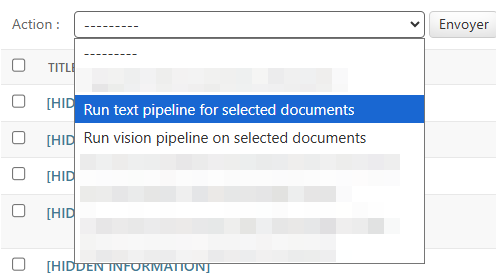
Activates offline ingestion and tasks system, needed for document visual analysis and long-running processing during ingestion.\
🧭 **Note:** This will unlock two addtionnal actions for Instance DPOs and Company DPOs in the admin's Document Page :
* Run text pipeline : on documents **with a status other than embeded** : retriger parsing and embedding with the current default parsing and embeddings configuration
* Run vision pipeline : on documents \*\*with a vision status other than embeded \*\*: retriger vision parsing and embedding with the current vision pipeline configuration
 **Default Value:** True
### **IS\_VISUAL\_INGESTION\_ON**
Activates the processing of visual elements during document ingestion.
**Default Value:** True
### **MAX\_DOCS\_LIBRARY\_SIZE**
Maximum number of documents stored in the library.
**Default Value:** 1000
### **MAX\_DOCUMENT\_SIZE**
Maximum allowed size per document.
**Default Value:** 100 MB
### **STORAGE\_LIMIT\_COMPANY / CUSTOM / PERSONAL / RANGE**
Defines storage limits (in MB or number of documents) per company, user, or data type.
**Default Values:**
* Company: 102400 MB
* Custom: 10240 MB
* Personal: 10240 MB
* Range: 1–10000000 documents
### **UPLOAD\_SESSION\_MAX\_CONCURRENT\_UPLOADS**
Maximum concurrent uploads per session.
**Default Value:** 20
### **UPLOAD\_SESSION\_QUEUE\_COOLDOWN\_PERIOD**
Cooldown time (in minutes) between queue checks during uploads.
### **UPLOAD\_SESSION\_QUEUE\_MAX\_PARALLEL\_PROCESSING\_DOCS**
Maximum number of documents processed simultaneously in an upload session.
**Default Value:** 10
***
## **Pipeline**
### **DEFAULT\_PIPELINE**
Specifies the default document ingestion pipeline version.
\*\*Default Value:\*\*v2.1.1
### DEFAULT\_PARSER\_MODEL
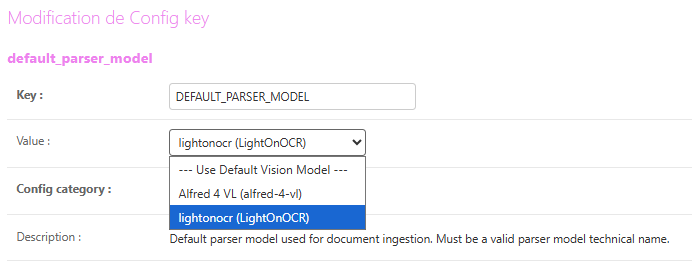
Default vision model used for parsing when vision parsing is active (2.2.x parsers).
Must be a valid parser model technical name, the VLM must have been declared with the parser attribute set to true to be selectable.
\*\*Default Value:\*\* LightOnOCR
**Default Value:** True
### **IS\_VISUAL\_INGESTION\_ON**
Activates the processing of visual elements during document ingestion.
**Default Value:** True
### **MAX\_DOCS\_LIBRARY\_SIZE**
Maximum number of documents stored in the library.
**Default Value:** 1000
### **MAX\_DOCUMENT\_SIZE**
Maximum allowed size per document.
**Default Value:** 100 MB
### **STORAGE\_LIMIT\_COMPANY / CUSTOM / PERSONAL / RANGE**
Defines storage limits (in MB or number of documents) per company, user, or data type.
**Default Values:**
* Company: 102400 MB
* Custom: 10240 MB
* Personal: 10240 MB
* Range: 1–10000000 documents
### **UPLOAD\_SESSION\_MAX\_CONCURRENT\_UPLOADS**
Maximum concurrent uploads per session.
**Default Value:** 20
### **UPLOAD\_SESSION\_QUEUE\_COOLDOWN\_PERIOD**
Cooldown time (in minutes) between queue checks during uploads.
### **UPLOAD\_SESSION\_QUEUE\_MAX\_PARALLEL\_PROCESSING\_DOCS**
Maximum number of documents processed simultaneously in an upload session.
**Default Value:** 10
***
## **Pipeline**
### **DEFAULT\_PIPELINE**
Specifies the default document ingestion pipeline version.
\*\*Default Value:\*\*v2.1.1
### DEFAULT\_PARSER\_MODEL
Default vision model used for parsing when vision parsing is active (2.2.x parsers).
Must be a valid parser model technical name, the VLM must have been declared with the parser attribute set to true to be selectable.
\*\*Default Value:\*\* LightOnOCR
 ### VLM\_SLIDING\_WINDOW\_SIZE
Vision parsing parameter : Maximum number of pages per document that can be sent and kept active in the parsing queue simultaneously (sliding window).
\*\*Default Value:\*\* 25
### EMBEDDING\_MODEL\_MIGRATION\_IN\_PROGRESS
Indicates whether an embedding model migration is currently in progress. When enabled, the system is actively migrating document embeddings to a new model version, which may temporarily affect search performance and document processing capabilities. During migration, users can continue to use the platform, but some RAG and search functionalities may experience reduced performance.
Default Value: False
🧭 **Note**: This parameter is typically managed by LightOn administrators during platform upgrades. When a migration is active, avoid uploading large volumes of documents or performing intensive search operations. Users will be notified when the migration is complete and full performance is restored.
⚠️ **Warning**: Do not manually enable this flag unless instructed by LightOn support, as it is automatically managed during embedding model updates.
## Custom Script
Allows administrators to add or replace custom scripts in the HTML content of the Paradigm instance.\
By default, this functionality integrates **Product Fruits**, a user onboarding and engagement platform.
### Description
By default, LightOn includes **Product Fruits**, that:
* Provides **interactive onboarding** for new users
* **Notifies users** about **new releases** or **maintenance periods**
* Offers **contextual help** to guide users during their first steps
* Performs **anonymous usage tracking** to improve user experience and platform performance
Product Fruits is **100% compliant** with industry data protection standards.\
It can be **customized with your organization’s branding**, and you will have access to an **admin account** to manage the onboarding flows and in-app communications.
> 💡 **Recommendation:** We strongly recommend keeping the default Product Fruits integration to support continuous platform improvement and user enablement.
**Default Value:** `Enabled (Paradigm instance key)`
> 🧭 You can **disable or replace** this script at any time via the **Config Keys** page if your organization uses a different onboarding or analytics tool.
***
***
### VLM\_SLIDING\_WINDOW\_SIZE
Vision parsing parameter : Maximum number of pages per document that can be sent and kept active in the parsing queue simultaneously (sliding window).
\*\*Default Value:\*\* 25
### EMBEDDING\_MODEL\_MIGRATION\_IN\_PROGRESS
Indicates whether an embedding model migration is currently in progress. When enabled, the system is actively migrating document embeddings to a new model version, which may temporarily affect search performance and document processing capabilities. During migration, users can continue to use the platform, but some RAG and search functionalities may experience reduced performance.
Default Value: False
🧭 **Note**: This parameter is typically managed by LightOn administrators during platform upgrades. When a migration is active, avoid uploading large volumes of documents or performing intensive search operations. Users will be notified when the migration is complete and full performance is restored.
⚠️ **Warning**: Do not manually enable this flag unless instructed by LightOn support, as it is automatically managed during embedding model updates.
## Custom Script
Allows administrators to add or replace custom scripts in the HTML content of the Paradigm instance.\
By default, this functionality integrates **Product Fruits**, a user onboarding and engagement platform.
### Description
By default, LightOn includes **Product Fruits**, that:
* Provides **interactive onboarding** for new users
* **Notifies users** about **new releases** or **maintenance periods**
* Offers **contextual help** to guide users during their first steps
* Performs **anonymous usage tracking** to improve user experience and platform performance
Product Fruits is **100% compliant** with industry data protection standards.\
It can be **customized with your organization’s branding**, and you will have access to an **admin account** to manage the onboarding flows and in-app communications.
> 💡 **Recommendation:** We strongly recommend keeping the default Product Fruits integration to support continuous platform improvement and user enablement.
**Default Value:** `Enabled (Paradigm instance key)`
> 🧭 You can **disable or replace** this script at any time via the **Config Keys** page if your organization uses a different onboarding or analytics tool.
***
***